How to generate eCoC XML
Learn how to generate eCoC XML and review XSD and ICM validation results.
IVI
Diagnose a rejected eCoC submission: separate XML schema errors, ICM findings, signing issues and connection failures before correcting and resubmitting.
Prepared by: Electronic COC Platform Editorial Team
Last updated:
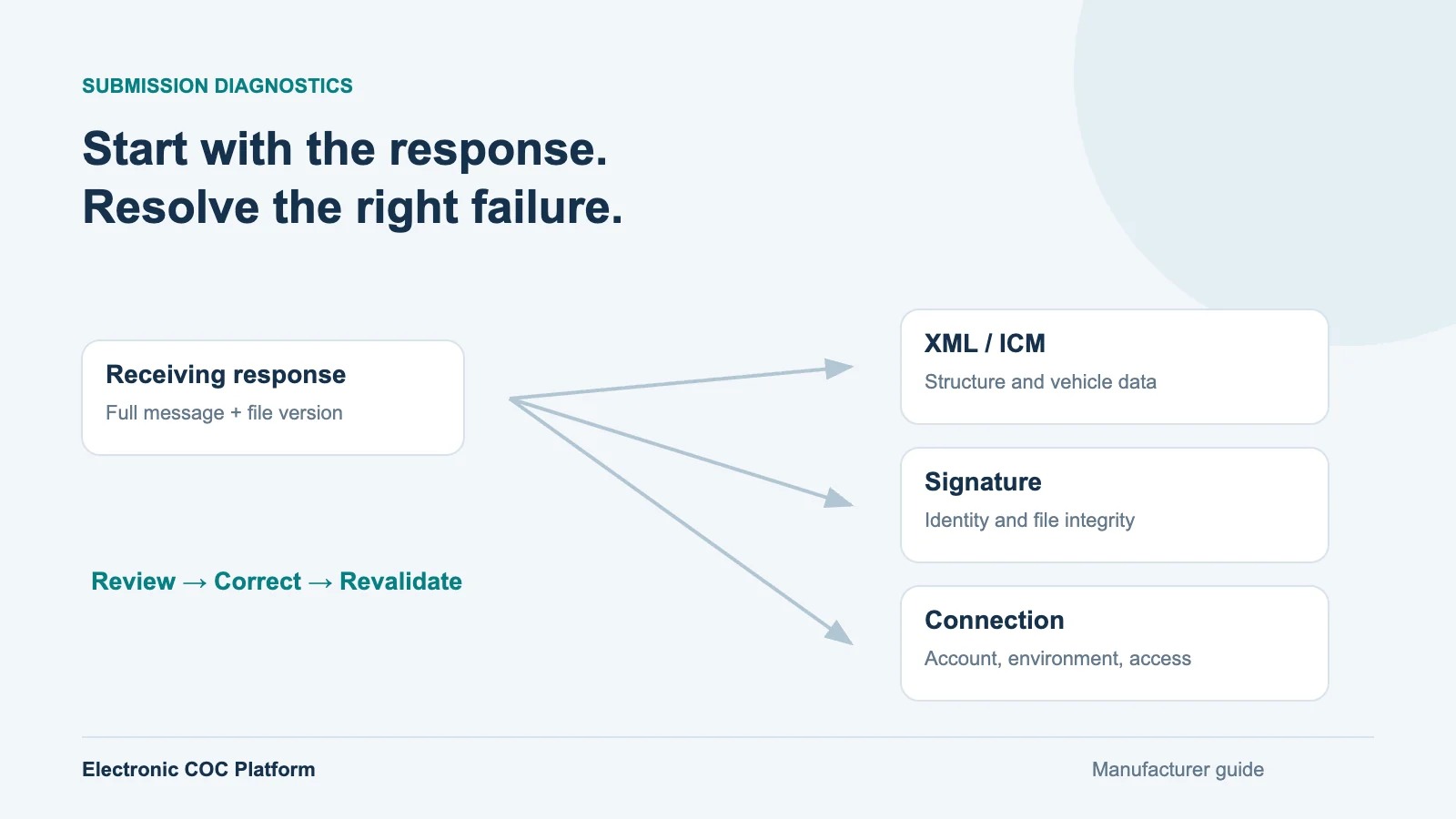
When an eCoC submission fails, start with the receiving response and the exact file that was sent. A missing XML element, an inconsistent vehicle value, a signing problem and an unavailable service require different actions. Repeatedly uploading an unchanged file can obscure the cause and create uncertainty about which submission was actually received.
This guide sets out a diagnostic sequence for EU and UK manufacturer teams. The examples are illustrative fault categories, not official error codes or a replacement for your receiving service's message book. Keep the actual response wording, rule reference and schema version with each incident. Official sources were checked on 16 October 2026.
Capture the VIN or internal vehicle reference, submission time, environment, request identifier, file version and full response. If your process uses file hashes, preserve the hash of the submitted bytes. Check whether there was an explicit rejection, an authentication failure, a network interruption or no business response at all. A timeout does not prove that the recipient rejected or failed to store the record.
Before retrying an uncertain delivery, use the service's documented status or duplicate-handling procedure. Do not invent a new vehicle identity to get around a repeated-submission warning. The receiving service's identifiers and correction rules decide how the record should be reconciled. Our NAP submission workflow links the signed file and receiving response to the manufacturer record.
| Finding | What to inspect | Next action |
|---|---|---|
| XML structure or data-type error | Applicable XSD, required element, order, format and namespace | Correct the mapping or source, regenerate and validate |
| ICM or vehicle-data finding | Rule reference, category, code list and related technical values | Resolve the vehicle meaning with the data owner |
| Signature or trust issue | Required profile, signer identity, certificate status and signed content | Review the signing configuration and verify the resulting file |
| Access or connection failure | Correct account, endpoint, environment and authorisation | Resolve access or availability before changing vehicle data |
| Unknown or duplicate outcome | Earlier request, receipt, file version and recipient status | Reconcile using the recipient’s documented procedure |
An XSD check establishes structural conformance to a particular schema. It does not establish that every declared mass, fuel value or approval reference is correct for that vehicle. RDW describes its IVI Checking Module as checking technical consistency and required information, with corrections needed after errors. Record which checks ran rather than using one undifferentiated “validated” label.
Confirm that the file uses the revision required by the recipient. “IVI 2.0” alone may not identify the complete schema package or national requirements. Read the reported element and its surrounding structure. An apparently missing element can result from the wrong parent, namespace or sequence, not just an empty spreadsheet cell.
For an illustrative case, a source system exports a mass as “3,500 kg”, while the mapped field expects a numeric value in a specified unit. Resolve the source convention and mapping explicitly. Simply stripping punctuation could change the meaning if the comma was a decimal separator. Preserve the original source value, transformation rule and corrected output so the same issue does not return in the next batch.
Where the recipient applies ICM rules, keep the rule identifier and complete message. Check the vehicle category, powertrain, approval version and any related fields before editing a single value. A field may look plausible by itself while contradicting another part of the same record. Refer to the applicable IVI documentation and the receiving authority's requirements.
Assign the issue to the person who owns the technical fact. IT can correct a mapping, but should not choose a replacement engineering value merely to pass a rule. If the approved configuration and production record disagree, homologation or engineering review is needed before the data is signed again. The IVI XML validation review should retain that decision with the file.
Learn how to generate eCoC XML and review XSD and ICM validation results.
The recorded interface is in English.
Verify the recipient's current signing requirements, the identity represented by the certificate and the required XML profile. Keep connection credentials separate from the credential used to sign the document. An account that can upload files does not by itself establish who signed a particular XML record. Changes to signed content can affect signature verification, so regenerate and sign the corrected candidate through the controlled process.
Do not assume identical checks across recipients. The VCA guidance currently distinguishes the presence of a digital signature from additional certificate and key validation. A file passing one service's current checks is not proof of suitability for another service. Review the actual target requirements through your XML signing workflow.
Suppose a manufacturer sees a connection timeout after sending a signed record. The operator then discovers an incorrect production value. The team should first reconcile whether the original reached the recipient. If it did, a correction process may be needed; if it did not, the service may allow a fresh submission. Uploading the changed file without resolving that status mixes a technical retry with a business correction.
Record the original attempt, status investigation, authorised data change, new validation result and newly signed output. Then retain the receiving acknowledgement for the final attempt. EUCARIS describes correction notifications in the EU exchange model; a manufacturer still follows its chosen NAP's specific correction procedure.
For each incident, record who owns the fix and what will demonstrate closure. A structurally valid file closes a schema defect; it does not close an unresolved delivery. Keep the receiving outcome and, where required, downstream retrieval checks with the vehicle. Maintain a short recurring-issue log so mapping defects can be fixed for the whole affected family rather than one VIN at a time.
Electronic COC Platform connects generation, validation, signing, submission and response tracking. For a technical review, bring an anonymised rejected file, the complete response and the recipient's schema reference. Those three items make the discussion more useful than a screenshot saying only that the upload failed.
Practical context
The submitted XML, its version, the target environment and the full response should stay together. This gives engineering, IT and the operator the same evidence when deciding what to correct.
Continue with the implementation area that matches your current task.
Bring the anonymised XML, full receiving response and target schema version. We can use them to define the relevant data, signing or submission review.
Use these primary sources to verify the regulatory context discussed in this article.
The official EU legal framework for vehicle type approval and market surveillance.
Open the official sourceOfficial information about the European vehicle and driving-licence information exchange network.
Open the official sourceShort, practical answers directly related to the subject.
No. XSD validation addresses structure. Vehicle consistency, signature requirements, access and the recipient’s business response must also be considered.
First establish the receiving status using the documented service procedure. A timeout can leave the outcome uncertain and does not prove that the first file was rejected.
Correct the controlled source, regenerate the affected output and sign the reviewed candidate again. Preserve the prior file and follow the recipient’s correction requirements.
No. They are diagnostic categories. Use the actual rule identifier, message book and response supplied by your receiving service.
Continue with practical guides on the same regulatory or operational subject.
Vehicle Type Approval
How EU vehicle type approval works: manufacturer preparation, technical service tests, authority decisions, production checks and the link to CoC and eCoC.
Published: 26 April 2024
Read moreRegulations
EUCARIS connects national authorities to exchange vehicle data. Learn how eCoC, IVI and National Access Points fit into a manufacturer’s submission workflow.
Published: 2 August 2024
Read moreBody-Built Vehicles
Prepare a multi-stage vehicle file: previous-stage approvals, bodybuilder changes, vehicle-specific CoC data and checks before eCoC submission.
Published: 9 July 2024
Read moreRegulations
Understand how vehicle conformity data supports European automotive regulation and why accurate regulatory datasets are critical for compliance processes.
Published: 14 June 2024
Read moreContact
Tell us what you are trying to solve in one short message. Share your name and email; our team will respond directly with the right next step.
Use the form here or open the full contact page for more context.
Open full contact page